

Artificial intelligence has moved past chatbots and content generators. The real shift happening right now is AI agents transforming traditional business software — turning static tools like CRM, ERP, and HR platforms into systems that think, plan, and act with minimal human input.
For years, business software has done one job well: store and organize data. CRM, ERP, HRMS, accounting tools, help desks, and marketing platforms all centralize information. But they still depend on people to search, click, update, and repeat the same steps every day. That manual layer is exactly what AI agents are removing.
In this post, we break down what AI agents actually are, how they're built, why traditional business software needs them, where they're already delivering results, how to actually roll them out, and what to watch before you adopt them.
What Are AI Agents?
An AI agent is software that understands a goal, plans the steps needed to reach it, uses multiple tools, and completes tasks on its own — while a human stays in control of the final decision. This is different from older automation, which only follows fixed, pre-written rules.
Here's a simple comparison. A traditional workflow might require an employee to:
- Open the CRM
- Search for a customer
- Review past conversations
- Check invoices
- Look at support tickets
- Create follow-up tasks
- Draft an email
- Update meeting notes
An AI agent can do most of this after a single instruction, such as: "Prepare everything I need for tomorrow's client meeting and draft the follow-up email once it's done."
Instead of jumping between eight tabs, the employee focuses on the actual conversation. The agent handles the admin work in the background. This is the core idea behind AI agents transforming traditional business software — less clicking, more outcomes.
The Core Components of an AI Agent
Most AI agents, regardless of vendor, are built from four working parts:
- Reasoning engine — the large language model (or similar system) that interprets the request and breaks it into steps.
- Memory — short-term context from the current task and, often, long-term memory of past interactions or preferences.
- Tool access — connections to APIs, databases, and business software (CRM, email, calendar, spreadsheets) so the agent can actually take action, not just talk about it.
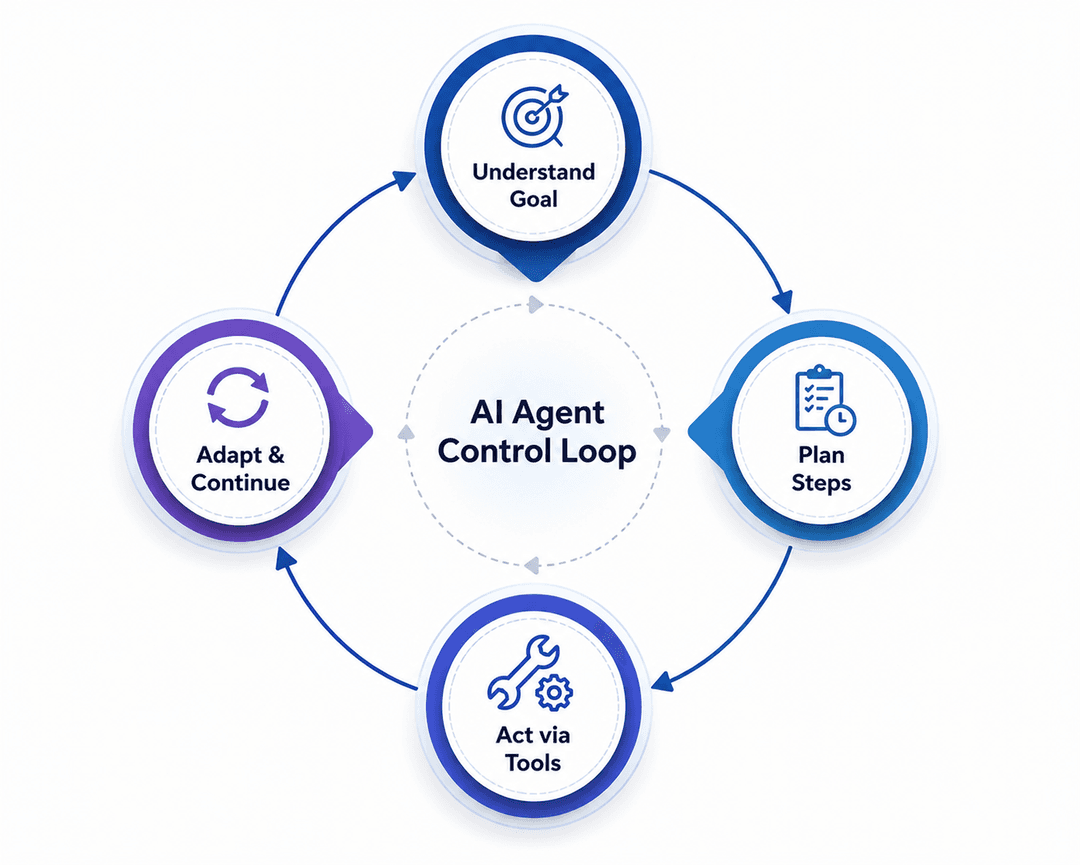
- Planning and control loop — the logic that decides what to do next, checks whether the goal is met, and asks for human approval when needed.
Understanding these four parts matters because it explains why agents can handle unpredictable situations that break traditional automation — the reasoning engine can re-plan on the fly, while a rules-based workflow simply stops.
Types of AI Agents Used in Business Software
Not all agents work the same way. Broadly, businesses are deploying three categories:
- Task agents — narrow, single-purpose agents that do one job well, such as drafting follow-up emails or triaging support tickets.
- Workflow agents — coordinate several steps across one system, like managing an entire onboarding checklist inside an HRMS.
- Cross-system agents — the most advanced type, capable of pulling data from a CRM, checking an accounting tool, and updating a project management platform in a single request.
Most companies start with task agents, prove the value, and then expand toward cross-system agents as trust and data quality improve.
Why Traditional Business Software Needs AI Agents
Most companies aren't short on software. A typical business already runs a CRM, an accounting tool, an HR system, a support desk, and a project management app — sometimes five or six platforms at once.
The real problem isn't missing features. It's the time employees lose moving between these systems, copying data by hand, and checking the same dashboards over and over.
AI agents fix this without forcing companies to rip out their existing stack. Instead, agents sit on top of current systems, pull information automatically, complete routine workflows, and hand employees a finished result instead of a half-done task list. Businesses don't need new software — they need their current software to work smarter.
The Hidden Cost of "Switching Tabs"
Research on knowledge work consistently points to the same pattern: employees lose a meaningful share of their day simply moving between applications, re-entering data that already exists somewhere else, and re-checking information they already looked up once. None of this shows up as a line item on a budget, but it adds up across a full team, every single day.
AI agents attack this cost directly. Because an agent can hold context across multiple systems at once, it removes the "switching" step entirely — the employee describes the outcome, and the agent moves between tools on their behalf.
Why This Matters More in 2026
Three trends are pushing this shift faster than expected:
- Software sprawl — the average business now uses far more SaaS tools than it did five years ago, multiplying the number of tabs an employee has to manage.
- Rising cost of manual labor for routine tasks — repetitive admin work is expensive to staff for and hard to scale during growth periods.
- Maturity of large language models — reasoning and tool-use capabilities have improved enough that agents can now be trusted with real, multi-step business tasks instead of just answering questions.
Real-World Examples of AI Agents in Business Software
Customer Support
Support teams often spend more time searching for information than actually solving a customer's problem. An AI agent can pull order history, shipping status, refund policy, and past conversations in seconds — then draft a reply or start an approved refund on its own.
In practice, this plays out in a few concrete ways:
- Ticket triage — agents read incoming tickets, tag them by urgency and topic, and route them to the right team automatically.
- First-response drafting — instead of a rep starting from a blank reply box, the agent prepares a draft grounded in the customer's actual history.
- Policy-bound actions — for low-risk cases (like a refund under a set amount), the agent can complete the action within pre-approved limits, escalating anything outside those limits to a human.
The result: reps spend their time resolving issues, not digging through records.
Sales and CRM
CRM upkeep eats hours every week: updating fields, logging calls, scheduling follow-ups. AI agents handle this quietly in the background.
- Automatic call and meeting logging — notes and next steps get written into the CRM without manual entry.
- Lead scoring and prioritization — agents flag which leads are actually worth a rep's time today, based on engagement signals.
- Follow-up drafting — personalized emails go out based on what was actually discussed, not a generic template.
- Pipeline health checks — agents flag deals that have gone quiet and suggest a next action.
Sales reps end up spending more time selling and less time typing.
Marketing Teams
Marketing agents track campaign performance daily instead of waiting for a monthly report.
- Real-time performance monitoring — spend, click-through rate, and conversion data get reviewed continuously, not just at month-end.
- Anomaly detection — a sudden drop in conversions or a spike in cost-per-click gets flagged the same day it happens, not weeks later.
- Content and creative suggestions — agents can propose new angles or formats based on what's already performing well with a given audience.
This turns reporting from a once-a-month task into a daily habit.
Human Resources
Onboarding checklists, interview scheduling, policy questions, and candidate summaries all take up HR bandwidth.
- Onboarding automation — new-hire paperwork, account provisioning, and welcome schedules get handled step by step without HR chasing each task.
- Candidate summarization — agents condense resumes and interview notes into a short brief for hiring managers.
- Policy Q&A — employees get instant answers to common HR questions instead of waiting on a ticket.
This keeps compliance rules intact while freeing HR teams to focus on people, not paperwork.
Finance and Operations
Though less discussed, finance teams are seeing similar gains. Agents can reconcile invoices against purchase orders, flag anomalies in expense reports, and prepare draft summaries for month-end close — cutting down the manual cross-checking that usually eats up the first week of every month.
AI Agents vs. Traditional Automation
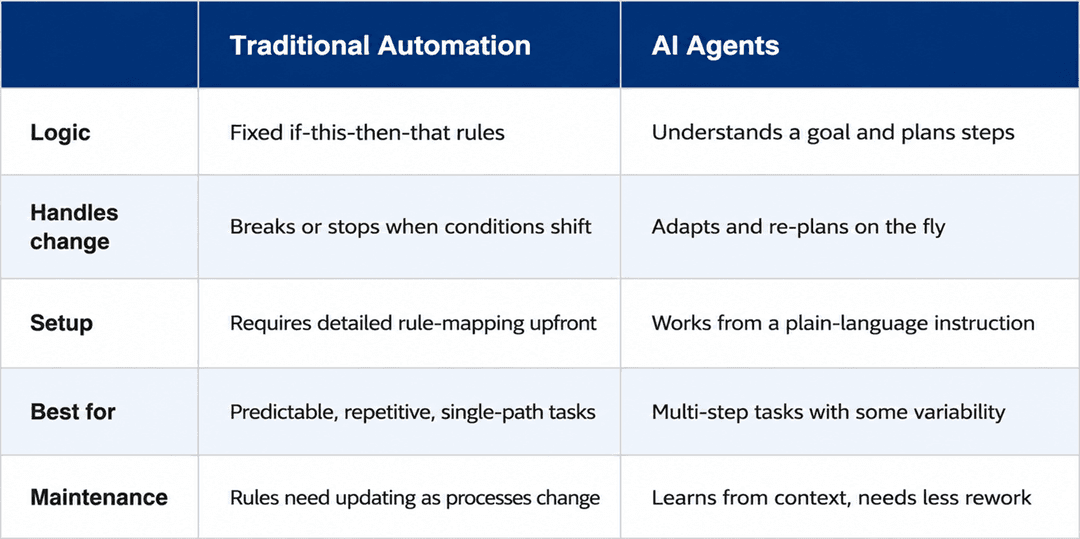
It's easy to lump AI agents in with regular workflow automation, but they solve different problems.
Traditional Automation
AI Agents
Logic
Fixed if-this-then-that rules
Understands a goal and plans steps
Handles change
Breaks or stops when conditions shift
Adapts and re-plans on the fly
Setup
Requires detailed rule-mapping upfront
Works from a plain-language instruction
Best for
Predictable, repetitive, single-path tasks
Multi-step tasks with some variability
Maintenance
Rules need updating as processes change
Learns from context, needs less rework
Traditional automation runs on fixed if-this-then-that rules. The moment something unexpected happens, the workflow breaks or stops entirely.
AI agents work differently. They understand the goal, not just the steps. If the situation changes, they adapt — checking new information, adjusting their approach, and continuing toward the outcome instead of stalling out. That flexibility is what makes agents a meaningful upgrade over older automation tools, not just a rebrand of the same idea.
Benefits of AI Agents for Businesses
Companies already using AI agents report gains across several areas:
- Less manual work across every department
- Faster approvals and shorter turnaround times
- Higher employee productivity
- Better, faster customer experiences
- More accurate reporting and analysis
- Real-time insights instead of monthly reviews
- Lower operational costs
- Smoother handoffs between disconnected systems
These results are why AI agents are becoming a core part of most digital transformation plans for 2026 and beyond.
How to Measure the Impact
If you're evaluating whether agents are actually working, track a small set of numbers before and after rollout:
- Average time to resolve a support ticket
- Hours per week spent on manual CRM data entry
- Time between a lead's first contact and first follow-up
- Number of reporting cycles needed to catch a marketing issue
- Employee hours saved per week on repetitive admin tasks
Small, measurable wins in one department are usually a better starting point than a company-wide rollout.
How to Start Implementing AI Agents
Adopting agents doesn't need to be an all-at-once project. A practical rollout usually follows four stages:
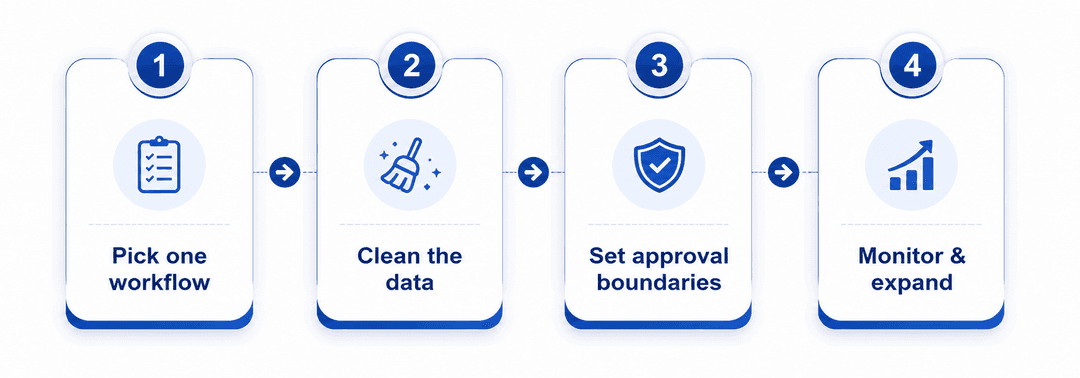
- Pick one repetitive, well-defined workflow. Ticket triage or lead follow-up emails are common starting points because the rules are clear and the risk is low.
- Clean up the underlying data. Agents are only as good as the data they can access — messy CRM fields or inconsistent ticket tags will limit results before the agent even starts.
- Set approval boundaries. Decide upfront what the agent can do on its own and what needs a human sign-off, especially for anything customer-facing or financial.
- Measure, then expand. Once the first workflow shows results, extend the agent to a related task, and only then consider cross-system agents that touch multiple platforms.
Challenges to Consider Before Adopting AI Agents
AI agents aren't a plug-and-play fix. Before rolling them out, businesses need clear policies around data privacy, security, compliance, and user permissions. Agents perform best with clean, well-structured data — messy records lead to messy results.
It's also important that employees know exactly when an agent can act independently and when it needs human sign-off. Some additional points worth planning for:
- Data access scope — agents should only see the data they actually need for their task, not a company's entire database.
- Audit trails — keep a record of what an agent did and why, especially for actions involving customer data or money.
- Change management — employees need to understand that an agent is a tool that removes busywork, not a signal that their role is at risk. Framing this clearly reduces resistance during rollout.
The goal here isn't replacing people. It's removing repetitive work so your team can focus on strategy, relationships, and growth.
The Future of Enterprise Software
Business software has already moved from desktop apps to the cloud to mobile. The next step is software that responds to plain language instead of menus and clicks — software that gathers information on its own, coordinates workflows across tools, and completes complex tasks without constant supervision.
Expect AI agents to become a standard layer across CRM, ERP, HR, finance, and support platforms over the next few years. Companies that adopt this early won't just automate what they already do — they'll change how the work gets done in the first place.
Over time, expect the distinction between "the software" and "the agent" to blur entirely — most platforms will simply ship with agent capability built in, the same way most tools today ship with a search bar or a mobile app.
Frequently Asked Questions
What is the difference between AI agents and AI automation? Automation follows fixed rules and stops when something unexpected happens. AI agents understand a goal, adapt to new information, and keep working toward the outcome using multiple tools.
Will AI agents replace CRM or ERP software? No. AI agents typically work on top of existing CRM and ERP systems, pulling data and executing tasks across them rather than replacing the platforms themselves.
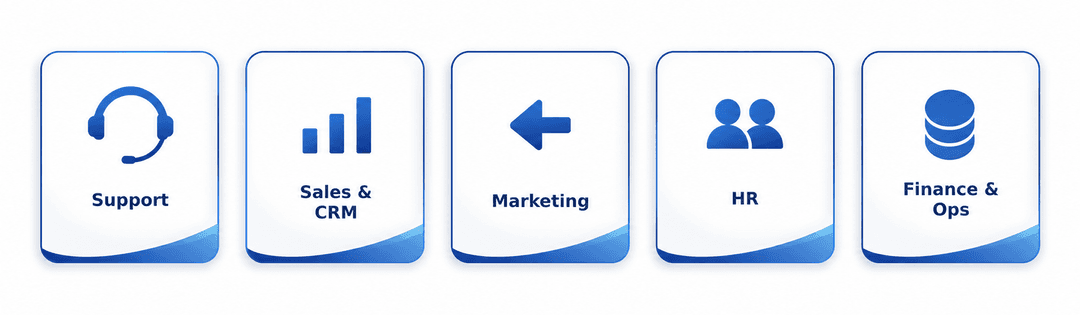
Which departments benefit first from AI agents? Customer support, sales, marketing, and HR usually see the fastest results because their work involves repetitive, data-heavy tasks that agents can take over quickly.
Is it expensive to add AI agents to existing business software? Cost depends on scope, but most companies start small — automating one workflow, like support ticket triage or lead follow-ups — before expanding to other departments.
How long does it take to see results from AI agents? Narrow, single-workflow deployments often show measurable time savings within a few weeks. Cross-system agents that touch multiple platforms typically take longer to prove out, since they depend on clean data across every connected tool.
Do employees need technical skills to work with AI agents? Not usually. Most business-facing agents are designed to be directed with plain-language instructions, similar to delegating a task to a colleague, rather than requiring coding or technical configuration.
Final Thoughts
AI agents are turning traditional business software from a passive tool into an active collaborator. They connect systems that used to work in isolation, remove repetitive manual work, and let employees spend their time on things that actually need a human.
The shift is already underway. The businesses that adapt early will be the ones setting the pace — not catching up to it.
What do you think — will AI agents become standard across every business tool within the next few years?