

Customer expectations are changing rapidly. People want faster answers, personalized assistance, and reliable support whenever they need it. At the same time, businesses must handle increasing support volumes without continuously expanding their customer service teams.
This is where an AI-powered customer support system can create significant value. Modern AI can answer common questions, search company information, summarize conversations, recommend solutions, and assist human support agents with everyday tasks.
However, successful AI customer support requires more than placing a chatbot on a website. Businesses need reliable knowledge, secure integrations, thoughtful workflows, human escalation, testing, analytics, and continuous improvement.
Therefore, the real objective should not be replacing customer service employees. Instead, businesses should combine AI automation with human expertise to create faster, more consistent, and more helpful customer experiences.
What Is an AI-Powered Customer Support System?
An AI-powered customer support system combines artificial intelligence with customer service workflows. It can understand customer questions, identify intent, retrieve relevant information, and generate responses using approved company knowledge.
For example, imagine a customer asking, “Where is my order?” A connected AI system can identify the request, authenticate the customer, access the order system, and provide the latest delivery information.
In addition, the system can recognize situations that require human assistance. When necessary, it can transfer the conversation to a support agent while preserving the customer's previous messages and relevant context.
In other words, an AI support platform is more than a chatbot. It connects AI, business information, automation, integrations, analytics, and human support into one customer service workflow.
Why Businesses Are Adopting AI Customer Support
Traditional customer support becomes increasingly difficult to scale as businesses grow. More customers usually create more tickets, repeated questions, longer queues, and greater pressure on support employees.
Many customer questions also follow predictable patterns. For instance, customers frequently ask about:
- Orders
- Refunds
- Shipping
- Subscriptions
- Account settings
- Product information
- Basic troubleshooting
Consequently, support employees can spend considerable time answering similar questions. AI can handle many of these repetitive interactions while human agents concentrate on complicated cases that require deeper investigation.
Moreover, AI can provide support outside normal business hours. As a result, customers can receive immediate assistance instead of waiting until the next available support representative becomes available.
However, automation should not become the only objective. Businesses should measure whether AI improves customer satisfaction, reduces unnecessary workload, and creates measurable operational value.
Key Benefits of AI-Powered Customer Support
Faster Response Time
One of the biggest benefits of AI customer support is faster response time. AI can process routine customer requests immediately, which reduces unnecessary waiting for simple questions and common problems.
Consistent Responses
Furthermore, AI can provide consistent responses when it uses approved information and defined workflows. This consistency can help businesses maintain clearer communication across large volumes of customer conversations.
Scalability
Another important benefit is scalability. When customer demand suddenly increases, an AI system can handle many routine conversations simultaneously without requiring an immediate increase in support staff.
Support for Human Agents
In addition, AI can assist human agents with summaries, suggested responses, customer intent detection, and information retrieval. Therefore, employees can spend more time solving complex problems instead of searching through repetitive information.
Step 1: Identify the Right Support Problems
Before selecting an AI model, businesses should identify the specific support problems they want to solve. Starting with technology before understanding the problem can create unnecessary complexity and cost.
First, review existing support tickets, emails, chat conversations, and frequently asked questions. Then, group similar requests together and determine which categories generate the highest support volume.
For example, a company might discover frequent questions about:
- Order tracking
- Password resets
- Refunds
- Shipping information
- Account updates
- Subscription changes
These repetitive requests can become strong candidates for initial automation. However, businesses should avoid automating every customer interaction during the first implementation.
Instead, begin with high-volume, low-risk requests where accurate answers are easy to verify. This approach creates measurable results while giving teams valuable experience with AI support workflows.
Step 2: Build a Reliable Knowledge Base
An AI assistant needs accurate information before it can provide useful answers. Therefore, building a reliable knowledge base should become one of the earliest stages of the project.
A knowledge base can include:
- FAQs
- Product documentation
- Troubleshooting guides
- Company policies
- Manuals
- Support articles
- Internal procedures
Together, these resources provide the foundation for accurate AI responses.
However, simply uploading documents is not enough. Information should also be organized, reviewed, and updated regularly so the system does not rely on outdated policies or instructions.
For example, if a company changes its refund policy, the knowledge base should reflect that change before customers receive automated responses. Consequently, knowledge management becomes an essential part of AI customer support.
Step 3: Use Retrieval-Augmented Generation
For businesses with large documentation libraries, Retrieval-Augmented Generation, commonly called RAG, can make AI customer support significantly more useful.
RAG allows the system to search relevant business information before generating an answer. As a result, the AI can ground its response in current company knowledge rather than relying only on general model knowledge.
The Basic RAG Workflow
Customer question → Knowledge search → Relevant information → AI-generated response
For example, when a customer asks about a specific product feature, the system can search approved documentation and provide information directly related to that product.
Furthermore, teams can update knowledge sources without rebuilding the entire AI application. Therefore, RAG can be particularly useful for businesses with frequently changing products, policies, and documentation.
Step 4: Choose the Right AI Model
The next step involves selecting an AI model that matches the actual requirements of the support system. Businesses can use commercial AI APIs, open-source models, or multiple models for different tasks.
Several factors should influence this decision, including:
- Response quality
- Speed
- Cost
- Privacy
- Context capacity
- Reliability
- Scalability
- Integration requirements
Importantly, the most powerful model is not automatically the most suitable option. Simple FAQ requests may work well with a faster and more economical model.
Meanwhile, complex customer conversations may require stronger reasoning capabilities. Therefore, businesses should test different models using realistic support scenarios before selecting the final architecture.
The goal is to choose a model that provides the required quality while meeting the company's operational, financial, and security requirements.
Step 5: Connect AI With Business Systems
A standalone chatbot can answer general questions, but its capabilities become significantly more useful when it connects securely with existing business systems.
Depending on the organization, an AI support platform can connect with:
- CRM systems
- Order management platforms
- Payment services
- Inventory databases
- Help-desk software
- Subscription platforms
Consider a customer asking, “Where is my order?”
The AI can authenticate the customer, send a request to the order API, retrieve current information, and provide a personalized response.
As a result, the customer receives an actual answer instead of being redirected to another webpage. This transforms a simple chatbot into a connected AI-powered customer support system.
Step 6: Add Human Support and Escalation
Human escalation is one of the most important components of a reliable AI customer support strategy. AI should recognize when a conversation requires human attention.
For example, the following situations may require an experienced support representative:
- Billing disputes
- Security concerns
- Sensitive complaints
- Complicated technical problems
- Unusual account issues
Customers should also have a clear way to request human assistance. Furthermore, the system should transfer useful conversation context when escalation occurs.
An agent can then review previous messages and understand the situation without asking the customer to repeat everything. Consequently, AI can support employees without creating additional frustration.
The strongest support workflows therefore combine automation for routine tasks with human expertise for complex situations.
Step 7: Design the AI Support Architecture
A reliable AI support platform needs an architecture that connects the customer interface, AI services, knowledge sources, business systems, and support teams.
Simplified Architecture
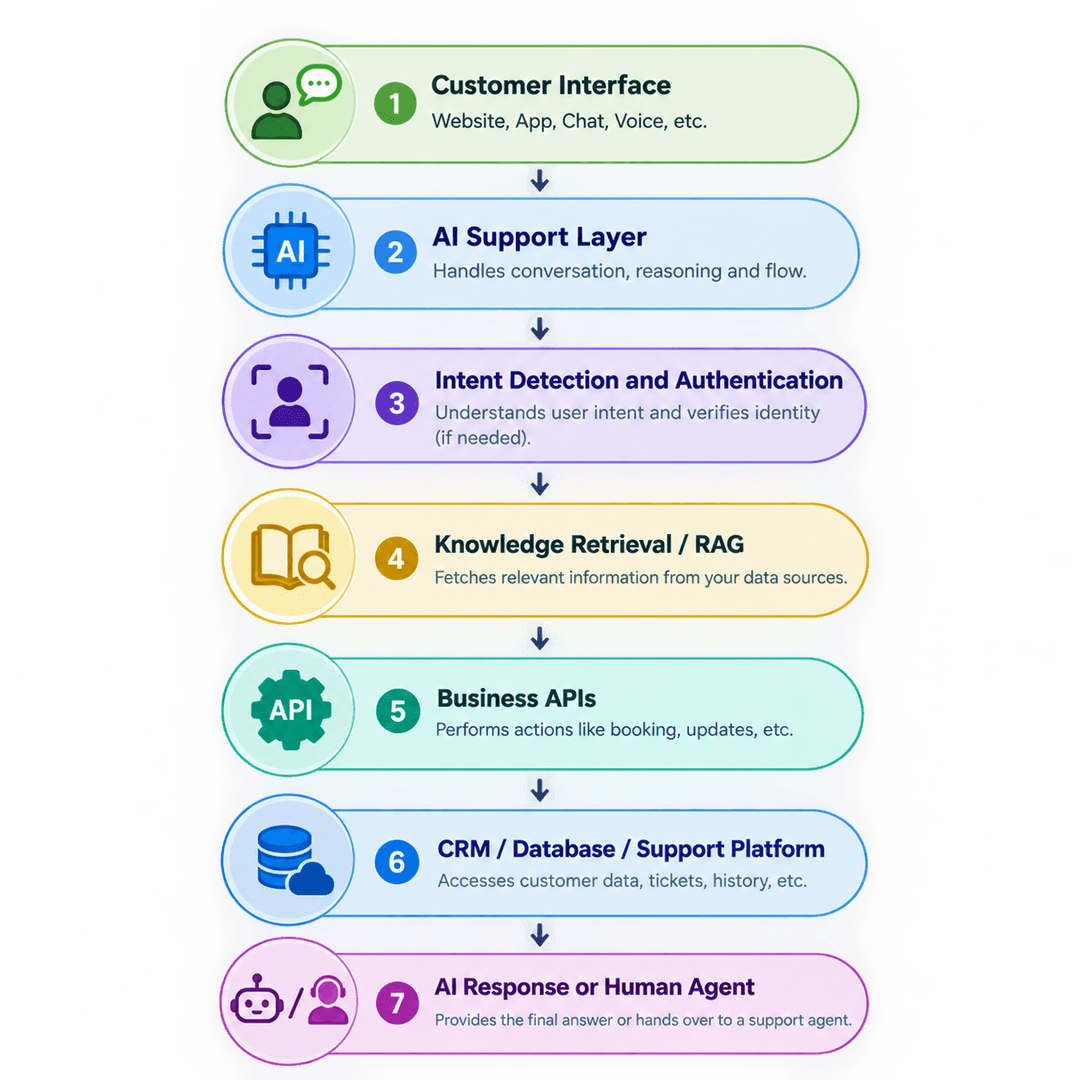
The frontend could use React or Next.js, while backend services could use Node.js, Python, FastAPI, or another suitable framework.
Meanwhile, databases can store application information, while vector search technologies can support semantic knowledge retrieval. However, the final technology stack should depend on business requirements.
Most importantly, every component should work together as part of a clearly defined support workflow.
Step 8: Prioritize Security and Data Privacy
Customer support systems can process personal information, account details, payment information, and other sensitive data. Therefore, security should be considered from the beginning of development.
Important areas include:
- Authentication
- Authorization
- Encryption
- Access control
- API security
- Logging
- Monitoring
- Data retention
Businesses should also carefully control which information the AI can access. An assistant that retrieves customer information should not automatically receive unrestricted access to every internal system.
Furthermore, teams should test for risks such as prompt injection, unauthorized access, accidental data exposure, and inappropriate responses.
Security should continue after launch as well. Regular monitoring, access reviews, and security testing can help organizations identify potential problems before they become larger operational risks.
Step 9: Test the AI Before Launch
An impressive AI demonstration does not guarantee a reliable production system. Before launch, businesses should test the assistant using realistic customer conversations and difficult edge cases.
Testing should include:
- Common questions
- Ambiguous requests
- Unknown questions
- Sensitive situations
- Incorrect assumptions
- Escalation scenarios
For example, the system should know when information is unavailable instead of confidently generating an unsupported answer. Similarly, it should ask for clarification when the customer's request is unclear.
Teams should also test response consistency, API integrations, authentication, security controls, and human handoff.
Therefore, quality assurance should cover both AI behavior and the surrounding software architecture.
Step 10: Measure Customer Support Performance
Launching an AI support system is only the beginning. Businesses need measurable indicators to determine whether the technology is actually improving customer service.
Useful Metrics
- First response time
- Average resolution time
- First-contact resolution
- Customer satisfaction
- AI resolution rate
- Escalation rate
- Ticket volume
- Agent productivity
- Cost per interaction
However, businesses should not focus on automation rates alone. A system that resolves many conversations but creates poor customer experiences may require significant improvement.
Instead, teams should evaluate efficiency and customer satisfaction together. This provides a clearer picture of whether AI is creating meaningful business value.
Over time, these measurements can also reveal which workflows need better automation or stronger human involvement.
Step 11: Improve the System Continuously
AI customer support should not be treated as a one-time software project. Customer questions change, products evolve, policies are updated, and new support requirements appear over time.
After deployment, teams should review conversations regularly. They can identify unanswered questions, incorrect responses, repeated escalations, and emerging customer needs.
Then, support teams can update knowledge sources, improve prompts, adjust workflows, and modify escalation rules based on those findings.
Continuous Improvement Cycle
Analyze → Improve → Test → Deploy → Measure → Repeat
As the system becomes more mature, businesses can gradually introduce:
- Multilingual support
- Voice assistance
- Proactive notifications
- AI-assisted agent workflows
What Makes AI Customer Support Successful?
Successful AI customer support depends on more than the quality of the underlying AI model. The surrounding workflow also determines whether customers receive useful and reliable assistance.
A strong system combines:
- AI
- Accurate business knowledge
- Secure data
- Automation
- Integrations
- Analytics
- Human expertise
Furthermore, businesses need clear ownership after launch. Someone should monitor performance, review conversations, update knowledge, and address emerging problems.
In other words, AI customer support should become part of the broader customer service strategy rather than operating as an isolated technology experiment.
Most importantly, businesses should design the system around customer needs instead of simply adopting whichever AI feature is currently popular.
Common AI Customer Support Mistakes
Businesses can make several mistakes when implementing AI customer support.
Automating Everything Immediately
One common mistake is attempting to automate every customer interaction immediately without first validating smaller use cases.
Instead, organizations should begin with specific problems that have clear business value. This makes implementation easier and provides useful performance data before expanding the system.
Using Outdated Information
Another mistake involves using outdated or poorly organized information. Even a powerful AI model can provide poor answers when its underlying knowledge is incomplete or incorrect.
Removing Human Support
Similarly, removing human support entirely can create frustration when customers encounter complicated problems. Therefore, businesses should always provide appropriate escalation paths for situations that require human judgment.
The Future of AI Customer Support
Customer support is moving beyond simple question-and-answer chatbots. Modern systems can understand intent, retrieve information, complete selected tasks, summarize conversations, and assist human agents.
At the same time, businesses are exploring:
- AI agents
- Voice assistants
- Multilingual support
- Proactive service
- Personalized customer experiences
However, technology alone does not guarantee better customer service. Businesses still need accurate information, thoughtful workflows, strong security controls, and accessible human support.
Therefore, the future of customer service will likely involve closer collaboration between AI systems and human teams.
AI can handle repetitive work, retrieve information, and assist with routine processes. Meanwhile, people can focus on situations requiring judgment, empathy, creativity, and deeper problem-solving.
Final Takeaway
Building an AI-powered customer support system starts with a customer problem, not an AI model. First, identify repetitive requests that can be automated safely and determine how frequently those problems occur.
Next, create a reliable knowledge base and select an AI model that matches your performance, cost, privacy, and scalability requirements. Then, connect the AI with relevant business systems so it can provide useful and personalized assistance.
After that, introduce secure authentication, human escalation, testing, monitoring, and performance measurement. Most importantly, continue improving the system as customer expectations and business processes change.
The goal is not simply to replace human support with AI. Instead, the goal is to combine AI automation with human expertise to create faster, smarter, and more helpful customer experiences.
For businesses exploring AI customer support, a practical starting point is simple: choose one repetitive customer problem, automate it carefully, measure the results, and expand from there.